
Bring your whole team. Decide exactly what each person can do.
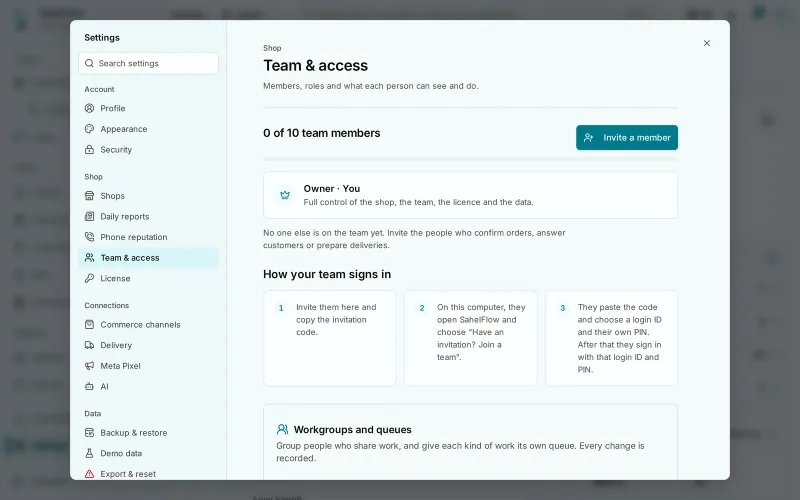
Invite up to ten team members, each with their own login and PIN. Pick a role — manager, operator, viewer — or tick the exact permissions. Change or remove access in one click.
A day in the shop
Your cousin answers the chats from his own login and sees only the shops you gave him.
Invite in a few clicks
Create an invitation, send the code on WhatsApp, and your colleague joins with their own login and PIN on the same installation.
- Personal login and PIN
- Invitations that expire
- Per-shop access
Each person sees their work
Operators see the queue, not the accounting. Viewers can look but not touch. Menus only show what a person is allowed to open.
- Four clear roles
- Custom permission sets
- Hidden where not allowed
Change access in one click
Promote, restrict, reset a PIN or remove someone. Changing someone's access ends their open sessions, and the history keeps who did what.
- Remove access in one click
- PIN reset by the owner
- Complete audit trail
What it does not do yet
- In testingRestore on a new PC
Questions
How many people can work together?
The owner plus up to ten active team members.
Can a member change their own PIN?
Yes, from Settings → My account. The owner can also reset it.
What happens when I remove someone?
They can no longer sign in to this shop. Their past actions stay in the history.
Keep exploring
Try it for seven days on your real orders
Every module unlocked, no card. If you'd like a hand at the start, we're on WhatsApp.
7 days on your PC · no card · a licence you buy once